
Managing AI workloads efficiently requires tracking the right metrics. AI load balancing ensures resources like GPUs and memory are used effectively while maintaining system reliability. Unlike older methods, modern AI load balancing relies on metrics such as GPU utilisation, inference time, and memory usage to handle traffic intelligently. Here’s a summary of the most important metrics to monitor:
- Latency: Focus on response time, especially the 99th percentile, to identify delays and improve user experience.
- Throughput: Track requests per second (RPS) to balance traffic and avoid overloading.
- Resource Usage: Monitor GPU, memory, and CPU utilisation to optimise performance and costs.
- Error Rates: Measure 5xx and 4xx errors to detect infrastructure or application issues early.
- Infrastructure Health: Keep an eye on disk IOPS, bandwidth, and system temperatures to ensure smooth operations.
Optimizing Load Balancing and Autoscaling for Large Language Model (LLM) Inference on Kub… D. Gray
Performance Metrics to Monitor
Keeping an eye on the right performance metrics is what keeps AI systems running smoothly, even under heavy traffic. These metrics help you understand how well your infrastructure is performing, pinpoint bottlenecks, and decide when to scale. Without them, you’re essentially flying blind. They’re your guide for managing scaling and traffic routing effectively.
Response Time (Latency)
Start with response time to get a sense of how quickly your system responds. Latency measures the time it takes to handle a request – from when it arrives to when the response is sent back. In load balancing, this can be broken into backend latency (the time taken between the proxy and backend) and total latency (from request receipt to the final response to the client). For AI inference tasks, backend processing can take several seconds, which makes traditional network routing less effective.
Tail latency is critical because it highlights the worst delays that averages often hide. For example, in a system processing 1,000 requests per second with an average latency of 100 ms, 1% of requests might still take 5 seconds. Google SRE teams focus on the 99th or 99.9th percentile to capture these worst-case scenarios. For AI systems, the 99th percentile latency of a backend can often reflect the typical experience for many users.
To monitor latency, use histograms instead of averages. Group requests into latency ranges (e.g., 0–10 ms, 10–30 ms, 30–100 ms) to visualise the distribution and identify tail latency issues. It’s also important to track latency for failed requests. A "slow error", like a timeout after several seconds, frustrates users much more than an immediate failure. Latency spikes are often the first sign of saturation, so tracking the 99th percentile over a one-minute window can serve as an early warning system.
Throughput
Throughput measures how many requests your system handles per second (RPS). For AI workloads, this helps ensure that expensive GPU resources are matched to actual traffic demands. Monitoring throughput also enables load-shedding, where excess requests are rejected to maintain overall performance. For AI inference, it’s essential to monitor both queue size and batch size to strike the right balance between throughput and latency.
Start by setting a queue size threshold – typically between 3 and 5 – and gradually increase it until requests approach your acceptable latency limit. Since AI tasks often have variable processing times, don’t rely solely on RPS. Combine it with data on CPU or GPU usage to ensure an even load across backends.
Resource Utilisation (CPU, Memory, GPU)
To get the full picture, pair response time and throughput metrics with detailed resource utilisation data. This measures how much of your system’s capacity is actively being used. For example, GPU utilisation (DCGM_FI_DEV_GPU_UTIL) shows the percentage of time the GPU is active, while GPU memory usage (DCGM_FI_DEV_FB_USED) tracks how much memory is being consumed.
For GPU-based inference, focus on GPU metrics rather than CPU or memory. The GPU is usually the bottleneck, and scaling based on CPU metrics can lead to unnecessary costs without improving performance. Modern load balancers use a "fullness" metric – current utilisation divided by maximum capacity – to route traffic more effectively. If a backend is highly utilised, the load balancer can redirect requests to other backends.
When autoscaling, prioritise queue size to maximise throughput and cost efficiency. Use batch size for latency-sensitive applications, especially when spikes in concurrent requests could slow response times. To avoid constant scaling adjustments, implement five-minute stabilisation windows in your Horizontal Pod Autoscaler. Set clear utilisation thresholds – like keeping memory usage below 80% – so load balancers can shift traffic before systems hit their limits.
Reliability and Error Metrics
After monitoring performance metrics, the next step is to focus on tracking errors and connection failures. These indicators are crucial for anticipating potential outages before they disrupt users. By categorising error types, you can pinpoint the root causes and address them more effectively.
Error Rates and Failed Connections
Understanding the nature of errors is key. For instance, errors from your load balancer – like HTTPCode_ELB_5XX (e.g., 502 Bad Gateway or 504 Gateway Timeout) – usually signal infrastructure issues. On the other hand, backend-generated errors such as HTTPCode_Target_5XX often point to problems within your application or model.
Connection reliability metrics are equally essential. Metrics like TargetConnectionErrorCount track failed connections between the load balancer and backends, while RejectedConnectionCount highlights when the system has reached capacity and is rejecting new connections. Additionally, metrics like ClientTLSNegotiationErrorCount and TargetTLSNegotiationErrorCount help identify issues with TLS protocols or certificate configurations.
Modern AI-driven load balancers, adhering to the ORCA standard, report metrics such as orca.eps (errors per second) and orca.rps_fractional (requests per second) through HTTP response headers. These metrics enable real-time traffic adjustments. When introducing new AI-driven custom metrics, using a dryRun flag allows you to monitor behaviour without affecting live traffic distribution.
Another useful metric is AnomalousHostCount, which flags hosts that exceed normal thresholds. This can help detect issues like memory leaks or GPU performance degradation early, preventing widespread failures. Load balancers typically report metrics every 60 seconds, but it may take up to 210 seconds for this data to appear in monitoring tools.
"It’s impossible to manage a service correctly, let alone well, without understanding which behaviours really matter for that service and how to measure and evaluate those behaviours." – Chris Jones, SRE at Google
When defining Service Level Indicators (SLIs), consider excluding 4xx errors from "total requests" if the focus is purely on service reliability. These client-side errors often stem from user mistakes rather than system issues.
Active Connections and Request Count
To complete the picture, pair error metrics with data on connection and request volumes. Monitoring these aspects ensures your infrastructure can handle demand without faltering.
The ActiveConnectionCount metric tracks the number of concurrent TCP connections – both between clients and the load balancer, and from the load balancer to backends. A sharp increase in this metric indicates that you’re nearing maximum capacity, which could lead to memory exhaustion or depleted worker threads.
Meanwhile, RequestCount measures the total number of requests processed over a given period. A sudden drop in this metric might suggest that the load balancer is unable to find healthy backend targets, hinting at potential backend unavailability or overload. The RequestCountPerTarget metric can help identify instances where specific servers are overwhelmed while others remain underutilised.
To maintain stability, set capacity thresholds to keep resource usage below 80%. This buffer allows for minor traffic surges without overloading the system. If capacity is exceeded, implementing load shedding can help by rejecting excess requests, preventing memory exhaustion and cascading failures.
Balancing performance metrics with reliability data is critical for achieving sustained uptime of 99.9% or more. Use multi-tiered alarms to signal different states: "At risk" (nearing capacity limits), "Non-optimal" (performance issues), and "Down" (system failure). Excluding health check requests from standard load balancer metrics provides a clearer view of actual user traffic and system health.
sbb-itb-3297dc6
Infrastructure Health Metrics
Keeping an eye on your physical infrastructure – like storage, temperature, and hardware health – is crucial for maintaining optimal GPU performance. Storage performance, in particular, plays a vital role in ensuring consistent data flow to GPUs.
Disk IOPS and Bandwidth
Disk IOPS (Input/Output Operations Per Second) measures how many read and write operations your storage can handle per second. Bandwidth, on the other hand, refers to the amount of data transferred over a specific time, often measured in MB/s or GB/s. These metrics are especially important for AI training pipelines, which rely heavily on high data throughput. If your storage can’t keep up, GPUs may sit idle, waiting for data to arrive.
Outdated storage systems can cause GPU utilisation to drop by 15–20%. If GPU utilisation dips below 70%, it’s often a sign of a network or storage bottleneck rather than a lack of computing power. Monitoring I/O queue depth can help you spot potential storage saturation early. A high queue depth indicates that requests are piling up, waiting for the disk to process them.
"It’s better to bring AI to the data, rather than bring data to the AI." – Manish Mahindra, Dell
To optimise performance, consider a tiered storage approach. Use high-speed NVMe SSDs for active workloads and shift less critical, older data to more affordable storage options. For cloud-based AI deployments, a 100+ Gbps Ethernet connection is often the sweet spot for maintaining high data throughput. In multi-GPU setups, minimise delays during distributed training by using low-latency solutions like InfiniBand or RDMA for GPU-to-GPU communication.
Temperature and System Health
Temperature monitoring is a key aspect of managing AI infrastructure. Overheating can trigger thermal throttling, where hardware automatically reduces performance to prevent damage. This can lead to unexpected latency during inference or extended training times, which wastes resources and may even impact model accuracy.
"Overheating can lead to throttling, reduced performance, or hardware damage." – Somit Maloo, Technical Education Content Developer, Cisco
Keep an eye on the GPU Thermal Margin (tlimit), which indicates how many degrees Celsius remain before throttling kicks in. If a GPU is nearing its limit, a load balancer should reduce its workload to prevent overheating. Tools like NVIDIA Data Center GPU Manager (DCGM) provide in-depth diagnostics, including error detection and thermal event tracking, which go beyond basic utilisation metrics.
Additionally, monitor ECC errors and interconnect health to catch hardware issues early. In multi-GPU environments, smooth data transfer between nodes is essential for distributed training. Integrating health checks with orchestration platforms like Kubernetes can enable self-healing systems. For instance, if a node reports high temperatures or hardware problems, jobs can automatically be rescheduled. Some advanced systems even use VM Failure Prediction Scores (ranging from 0.0 to 1.0) to estimate the likelihood of hardware degradation within the next five hours, allowing workloads to be migrated proactively.
To keep AI scaling cost-effective, aim for Power Usage Effectiveness (PUE) targets between 1.2 and 1.5. Many organisations are adopting liquid cooling and immersion systems to manage high-density AI workloads while cutting power consumption. Combining these metrics with performance monitoring gives a well-rounded view of your infrastructure’s health.
Metrics Checklist
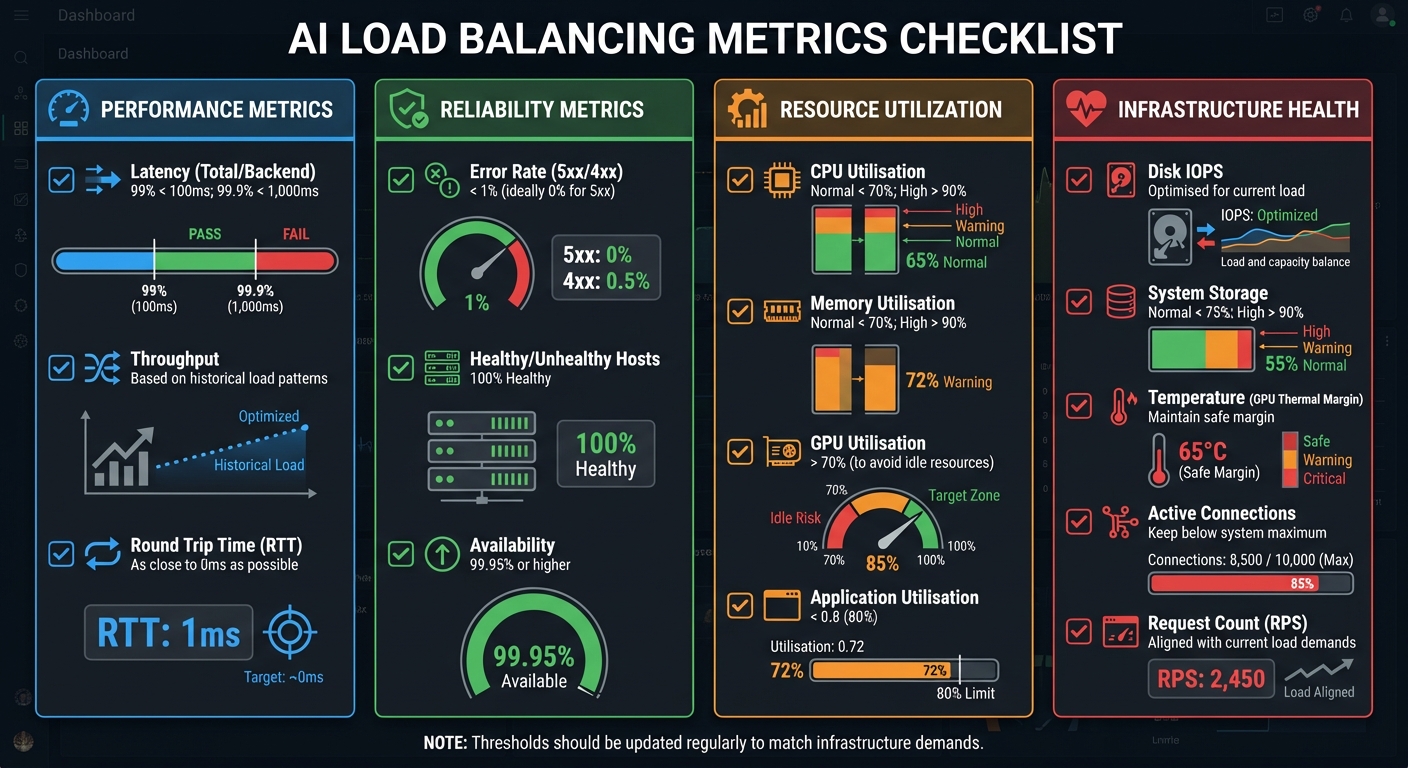
AI Load Balancing Metrics Monitoring Checklist with Target Thresholds
Here’s a handy checklist of key metrics to monitor when managing AI load balancing. It brings together performance, reliability, resource usage, and infrastructure health metrics into one streamlined guide.
| Category | Metric | Definition | Target Threshold | Recommended Tools |
|---|---|---|---|---|
| Performance | Latency (Total/Backend) | Time from receiving a request to sending the last byte of the response | 99% < 100ms; 99.9% < 1,000ms | Google Cloud Monitoring, Splunk ITSI, OCI Monitoring |
| Throughput | Data volume sent or received per second | Based on historical load patterns | Prometheus, Google Cloud Monitoring | |
| Round Trip Time (RTT) | Time for a signal to travel to its destination and back | As close to 0ms as possible | OCI Monitoring, Google Cloud | |
| Reliability | Error Rate (5xx/4xx) | Percentage of requests resulting in server or client errors | < 1% (ideally 0% for 5xx errors) | Splunk ITSI, OCI Monitoring |
| Healthy/Unhealthy Hosts | Number of active versus failed backend instances | 100% Healthy | Middleware, OCI, Kovair | |
| Availability | Percentage of time the service is operational | 99.95% or higher | Google Cloud Monitoring, Splunk ITSI | |
| Resource Utilisation | CPU Utilisation | Percentage of compute capacity in use | Normal: < 70%; High: > 90% | Splunk ITSI, Middleware, Prometheus |
| Memory Utilisation | Percentage of RAM used | Normal: < 70%; High: > 90% | Splunk ITSI, Google Cloud Monitoring | |
| GPU Utilisation | Percentage of GPU capacity in use | > 70% (to avoid idle resources) | NVIDIA DCGM, Prometheus | |
| Application Utilisation | Custom metric for app-specific resource pressure | < 0.8 (80%) | Google Cloud (ORCA) | |
| Infrastructure Health | Disk IOPS | Read/write operations per second | Optimised for current load | Splunk ITSI, OCI Monitoring |
| System Storage | Percentage of disk space used | Normal: < 75%; High: > 90% | Splunk ITSI | |
| Temperature (GPU Thermal Margin) | Remaining degrees before thermal throttling occurs | Maintain a safe margin | NVIDIA DCGM | |
| Active Connections | Number of concurrent open connections | Keep below system maximum limits | Splunk ITSI, OCI | |
| Request Count (RPS) | Total requests handled per second or minute | Aligned with current load demands | Google Cloud, OCI, Kovair |
These metrics are essential for keeping AI workloads balanced and systems running smoothly. For custom metrics, consider using the Open Request Cost Aggregation (ORCA) standard to report values like orca.cpu_utilization and orca.mem_utilization through HTTP response headers. Before fully implementing these, use a ‘dryRun’ to ensure accuracy and reliability.
"It’s impossible to manage a service correctly, let alone well, without understanding which behaviours really matter for that service and how to measure and evaluate those behaviours." – Chris Jones, John Wilkes, and Niall Murphy, Google’s Site Reliability Engineering team
Keep in mind that thresholds should be revisited and updated regularly to match the changing demands and performance of your infrastructure.
Conclusion
Keeping tabs on AI load balancing metrics is crucial for ensuring your infrastructure operates efficiently. Regularly monitoring areas like performance, reliability, and resource usage gives you the insight needed to identify bottlenecks early. This helps you avoid pitfalls like reduced model accuracy, longer training times, or unnecessary spending on overprovisioned resources.
The metrics we’ve discussed work together to provide a clear picture of your system’s health. For example, tracking latency helps maintain a seamless user experience, while monitoring CPU, GPU, and memory usage ensures you’re using your computational resources effectively. Meanwhile, keeping an eye on error rates and availability metrics is key to maintaining reliable services – something especially critical in industries like finance or healthcare, where uptime often needs to meet or exceed 99.95%.
"Monitoring your AI infrastructure is not merely a technical task; it’s a strategic imperative." – Somit Maloo, Technical Education Content Developer, Cisco
Taking a proactive approach to monitoring beats scrambling to fix issues after they arise. Setting baseline metrics and employing health-aware routing lets you redirect traffic from underperforming endpoints before users notice a dip in quality. This strategy significantly reduces Mean Time to Recovery (MTTR) by enabling faster root cause identification through telemetry data, saving valuable time during investigations.
This method aligns well with earlier discussions on scaling and resource efficiency. Keep in mind that monitoring isn’t a one-and-done task. Traffic patterns evolve, and what worked yesterday might not suit tomorrow’s demands. Regularly review and adjust your metric thresholds to stay ahead of the curve and ensure your AI workloads continue to perform at their best.
FAQs
Why is monitoring the 99th-percentile latency important in AI-driven load balancing?
Tracking 99th-percentile latency is key to gauging how AI-driven load balancing systems handle peak conditions. This metric sheds light on the slowest response times experienced by the top 1% of users, helping to pinpoint rare delays or bottlenecks that might otherwise go unnoticed.
Paying attention to this percentile allows IT teams to build systems that maintain steady and dependable performance, even during high-demand periods. This approach is essential for keeping users happy while ensuring infrastructure runs efficiently in today’s fast-moving digital world.
Why is monitoring throughput important for optimising AI workloads?
Monitoring throughput is a critical step in assessing how much data your AI system handles over a set period. Keeping an eye on this metric allows you to pinpoint bottlenecks, make smarter resource allocation decisions, and improve your system’s overall performance.
By understanding throughput, you can ensure your infrastructure operates smoothly, cutting down on avoidable expenses and boosting the dependability of your AI-powered load balancing solutions.
Why is it essential to monitor both GPU usage and memory utilisation in AI systems?
Keeping tabs on GPU usage is key to ensuring your AI systems run smoothly. It helps you avoid scenarios where compute resources are either underutilised or overloaded, striking the right balance for efficient operations and getting the most out of your hardware investment.
Equally important is monitoring GPU memory usage. This helps you steer clear of out-of-memory errors that could interrupt your workloads. It also aids in planning for capacity, making sure your systems can handle growth without spiralling costs.
By tracking both these metrics, you can fine-tune performance, sidestep bottlenecks, and keep your AI infrastructure dependable and cost-efficient.


